How to Create a Telegram Bot Without Coding: Step-by-Step Guide
Build a coffee shop bot with a menu and lead capture in JustBot, step by step, with no code or server.
You don't need a developer or a server to give your business a Telegram bot. In JustBot you build the bot on a canvas, like a flowchart of messages, buttons, questions and actions. There's nothing to host or deploy: the bot runs on our servers from the moment you connect it.
Below we build a real example from start to finish: a coffee shop bot that shows the menu, takes requests and sends each one to you in Telegram. It takes about 15 minutes.
Step 1. Get a token from @BotFather
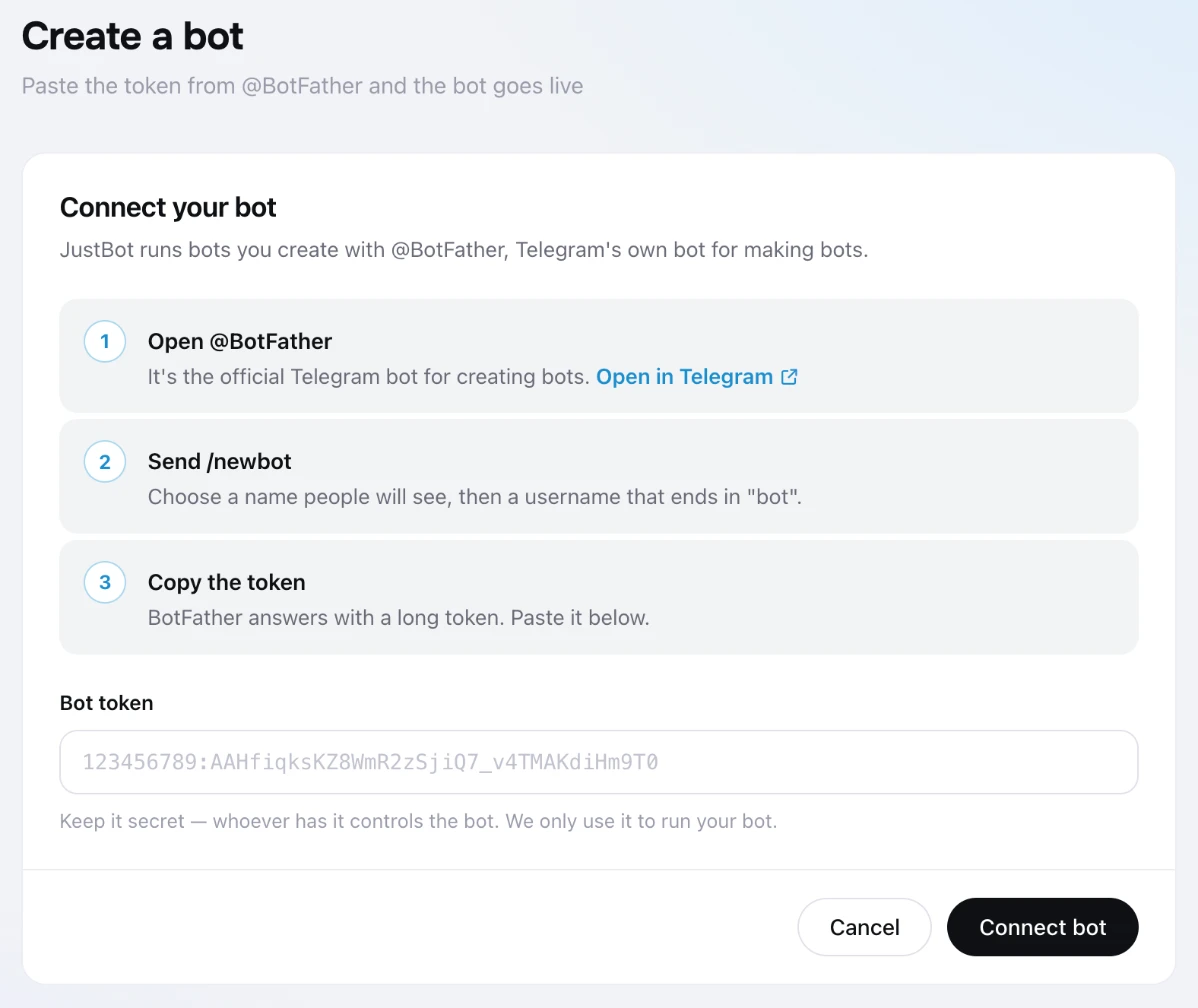
Every Telegram bot is registered through @BotFather, Telegram's official bot for creating bots. It gives you a token, and JustBot uses that token to run your bot.
- Send @BotFather the /newbot command.
- Choose the display name people will see, for example "Bean Coffee".
- Pick a username that ends in bot, such as bean_coffee_bot.
- Copy the token from the reply. It looks like 7012345678:AAF....
The bot stays yours. Its name, username and profile picture belong to you, and if you ever leave JustBot, you just issue a new token with /revoke in BotFather.
Step 2. Connect the bot to JustBot
Sign in to JustBot and click "Create a bot" at the top of the sidebar. Paste the token into the "Bot token" field and click "Connect bot". The bot is now live. Next, you teach it what to say.
 Step 3. Start from a template
A flow is what the bot does when someone writes to it. You don't have to start from a blank canvas: the "Flows" page has a "Start from a template" section with ready-made bots for common jobs, including a welcome menu, a lead form, appointment booking, a quiz, a lead magnet and an FAQ.
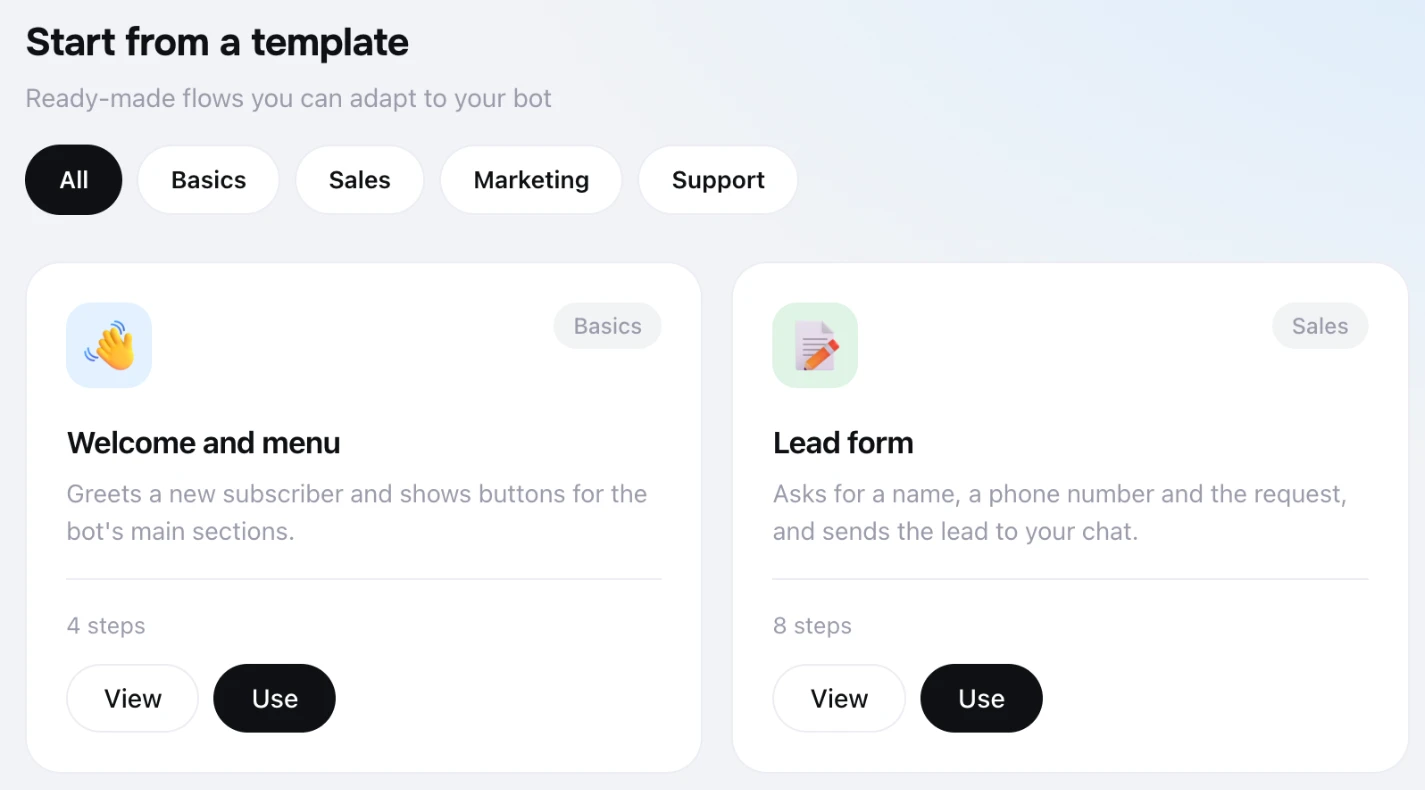 Click "Use" on "Welcome and menu". The canvas now has:
- an entry point triggered by /start, which is what the bot receives when someone opens it for the first time;
- a greeting with three buttons: about us, menu and prices, how to find us;
- three messages, one behind each button.
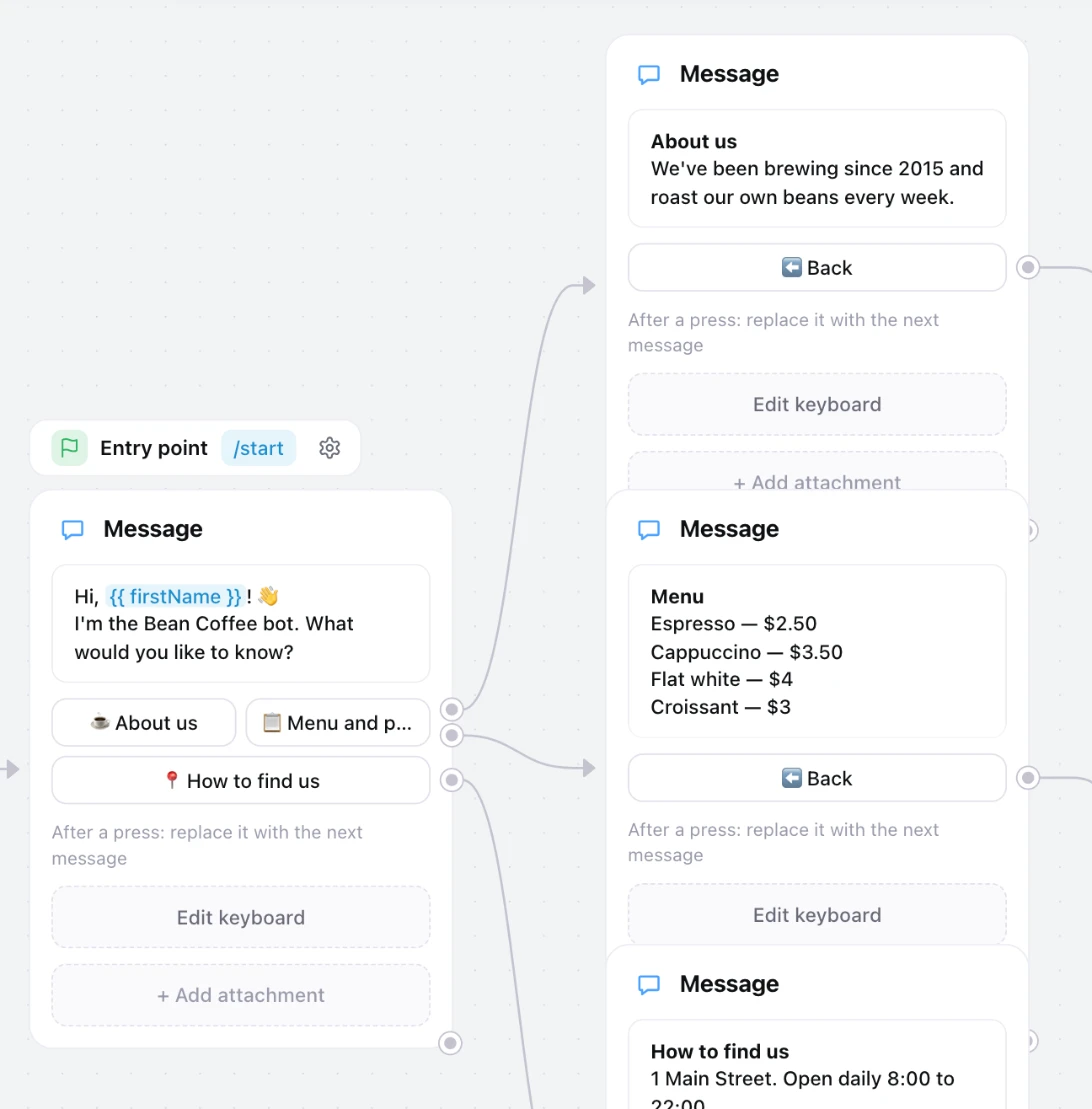 The template texts are only samples, so replace them with your own. Click a card to edit its message. Add {{ firstName }} and the bot greets each person by name. "+ Add button" adds a button, and you choose where it leads by drawing a line to another card.
Step 4. Switch it on and test it
While you edit, the flow is a draft and the bot ignores it. When it's ready, turn on the "Running" switch and click "Open bot". Telegram opens your bot and you can walk through it exactly as a customer would.
 Later changes take effect right away, with nothing to restart.
Step 5. Get leads in Telegram
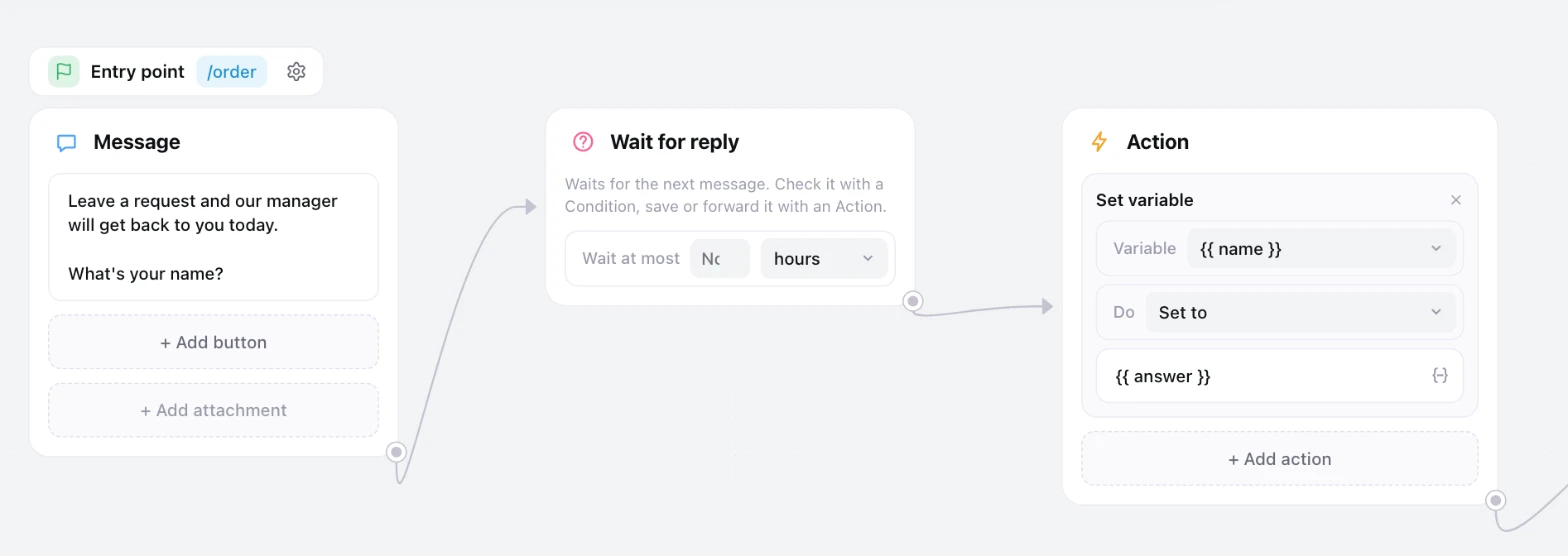
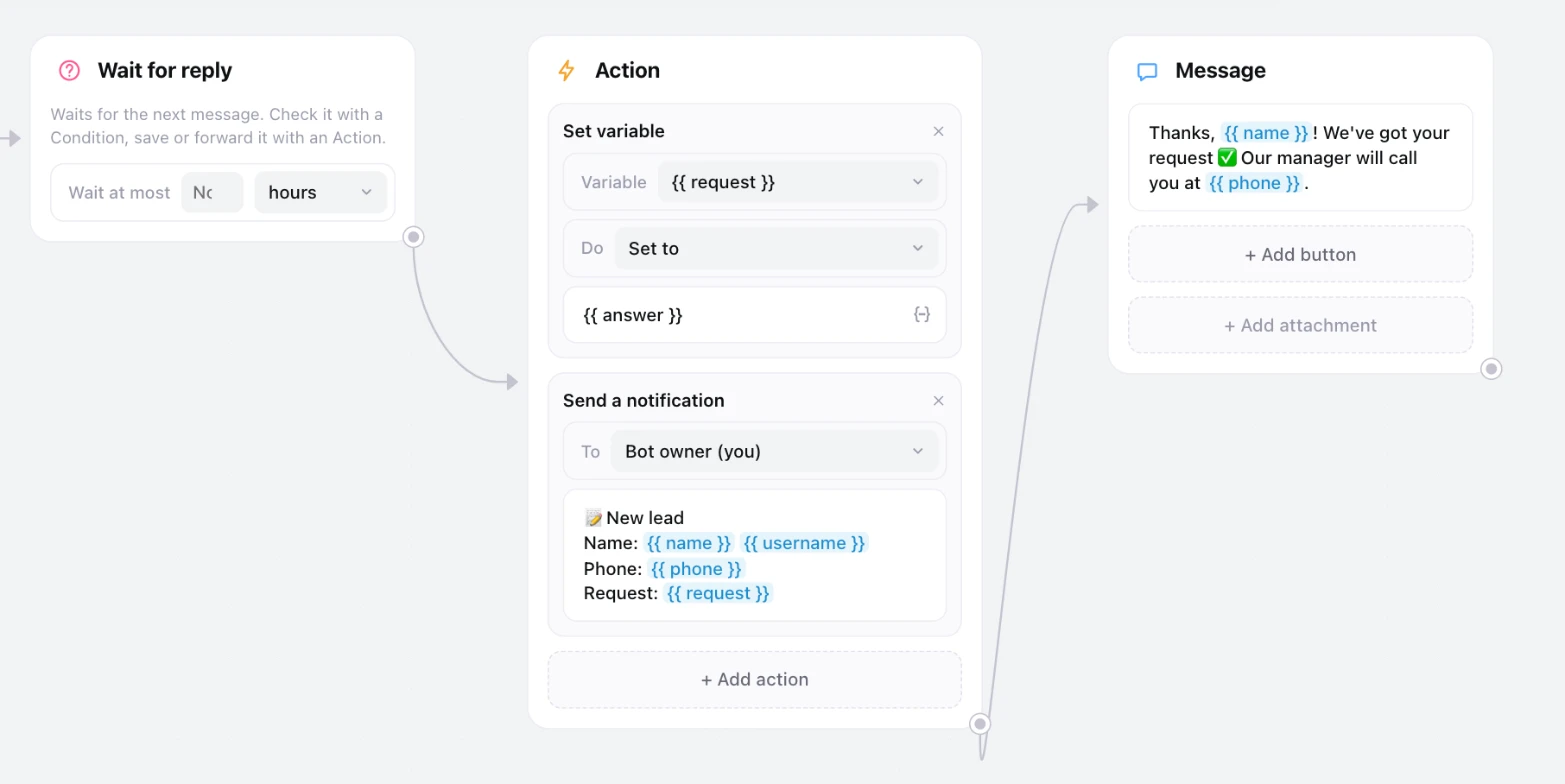
This is the reason most businesses want a bot. The "Lead form" template already works out of the box, but here's how it's built, because any questionnaire follows the same pattern:
- Message: "What's your name?"
- Wait for reply: the bot waits for the person to answer.
- Set variable action: the answer is saved as name.
- Message with a Phone number button: people share their number with one tap instead of typing it.
- Send a notification action: you receive "New lead: {{ name }}, {{ phone }}".
- Message back to the customer: "Thanks, we'll call you today."
 The notification can also go to a team group instead of just you. To keep every lead in a spreadsheet, add the "Add a row to a sheet" action, which writes to Google Sheets.
What else you can build
- Conditions. Check that someone entered a real phone number or email, whether they follow your channel, or whether it's business hours, and send them down different branches.
- Delays. "Remind me tomorrow" or "send lesson two in a week".
- Keyword replies. The bot answers "price", "delivery" or "opening hours", which gives you an auto-responder for common questions.
- Tracked links. t.me/your_bot?start=instagram starts a specific flow and remembers where the person came from.
- Schedules. A flow that runs on its own, for example every Monday at 10:00.
- Broadcasts to all subscribers, now, later or on a schedule.
Pricing
Your first bot is free up to 1,000 subscribers, with the full builder and no credit card. After that it's $2 per bot per month, with unlimited subscribers and broadcasts.
If your bot is more than you want to build yourself, send us the brief and we'll build it for you.
FAQ
Do I need a server or hosting?
No. The bot runs on our servers. All you provide is the token.
How long does it take?
A menu bot from a template takes 10-15 minutes, BotFather included. A bot with lead capture, conditions and several flows is an evening's work.
Can the bot message someone first?
Only people who have already pressed "Start" in your bot. Telegram doesn't let bots message anyone who hasn't opened them.
When do I still need a developer?
When the bot has to talk to your CRM or accounting system and there's no ready-made integration, when it needs custom calculations, or when you need a full app inside Telegram. Even then, a prototype in the builder is a cheap way to check whether your customers want a bot at all.
Create your bot in JustBot. The first one is free.